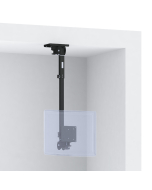
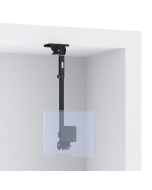
Toast Compatible Fully Articulated Ceiling Mount for Terminal, with Extendable Arm + Enhanced Pan -Tilt Head
| Product Code | 80104-TOAST |
|---|---|
| Availability | In Stock |
| Delivery Time | 1-7 Days |
| Note | Product usually ships within 24 hours of payment/order. |

General Features
-
This articulating ceiling VESA mount can be used as a universal support system for all 75mm or 100mm VESA compatible monitors, touchscreens and terminals for Point of Sale / POS, Kitchen Display Systems / KDS in commercial kitchens, retail, restaurants, offices, industry, shops, medical, maritime, schools, laboratory and many other applications.
-
An innovative set of joint assemblies allow seven axis of position adjustment when attached to a Ceiling shelf or other flat, horizontal surface. This assembly is also available in wall and countertop mount configurations.
-
Beyond having very flexible articulation; this mount has the key feature of being easily LOCKED in any desired screen position; this ability is VERY important when using touch screen equipment as it PREVENTS the screen from moving away from the user each time a touch is input.
-
This assembly supports up to 25 lbs., is made from steel and finished with a durable, black, low gloss, micro wrinkle powder coat that resists fingerprints.
-
Visit kitchendisplaysystems.com for a free, easy to understand tutorial that covers all aspects of Kitchen Display Systems knowledge!
Toast Terminals
- Toast Flex POS 14"
- Toast Flex for Guest 8"
- Toast Flex for Kitchen 14", 22"
- Toast Kitchen Display System, Toast KDS 14", 22"
- Toast Kiosk 22"
Toast Accessories
- Toast Printer TP200, Impact Printer, Label Printer TLP400
- Toast Tap (On Counter and Direct Mount)
- Toast MSR and EMV
- Toast Hub
- Toast Scale
- Toast Barcode Scanner
Elo Terminals and Accessories
- Elo POS Z10, Z20, Z30, 15", 17", 22"
- Elo Guest-Facing Display
- Elo POS Pack
- Elo I-Series Terminals 10", 15", 17", 22", 24"
- Elo E-Series Terminals 15"
- Elo Kitchen Display System, Elo KDS
- Elo 90-Series Screens
- Elo Medical Touchscreens
- Elo Touchscreen Signage / Interactive Displays
- Elo Edge Connect Accessories (MSR, Status Light, RFID)
Epson Printers
- Epson TM-T20 II
- Epson TM-U220B
- Epson TM-M30
- Epson TM-T88V
- Epson TM-L90
Enhanced VESA 75-100mm Pan and Tilt Head with side-to-side tilt adjustment on an Offset Arm Bracket
-
A universal mount that works with any 75mm or 100mm VESA compatible screen.
-
Tightening the 2 four-point knobs applies variable clutching resistance to allow adjustment of the up and down tilt position of the screen. Tighten either of the two 10-32 Phillips head screws adjacent to the four-point knobs to permanently secure the tilt position.
-
Tightening the five- point knob below the Offset bracket applies variable clutching resistance to allow adjustment of the side-to-side pan position of the screen. A 10-32 Phillips head screw in the center of the lower Panning plate can be tightened to permanently secure the pan position.
-
Tightening the three - point knob at the rear center of the VESA mounting plate applies variable resistance to allow adjustment of the side-to-side screen tilt position.
-
Tighten the 10-32 Phillips head screw on the lower Panning plate into one of the holes in the Offset bracket to permanently secure the pan position.
-
The Offset Bracket attaches the VESA pan and tilt head to the end of the arm and allows adjustment of the up and down “Offset angle” of the arm.
-
Adjusting the Up and down position of the arm at the Offset bracket: Remove the 1/4” Wire-Lock Clevis Pin from the Offset Bracket to adjust the up and down position of the arm; then reinsert the pin into one of the holes in the Offset bracket and through the arm to secure the new position.
-
Includes 4 pieces of M4 Phillips head screws to attach the VESA mounting plate to the back of the screen.
Telescopic Arm Section
-
The overall length of the Telescopic arm section can be adjusted up to 6 inches. To adjust; grasp the inner arm and slightly loosen the three-point knob just until the inner arm can be moved. Pull the inner arm out to extend it or push it in to retract the arm to the desired new length; then retighten the knob to secure the position.
Panning Ceiling Mounting Plate, Offset Bracket and Arm
-
The Panning Ceiling Mounting Plate supports one arm assembly and can be attached to any flat, smooth horizontal surface.
-
Attach the mounting plate to the mounting surface with appropriate fasteners.
-
The side-to-side pan position resistance is preset at the factory with a 5/16” bolt in the center of the upper standoff plate to allow the arm offset bracket to move freely side to side and should not need adjustment. However, a ½” wrench can be used to adjust the tension on this bolt.
-
To adjust the side-to-side pan position of the Offset Bracket and Arm; remove the 10-32 Thumbscrew from the top of the Panning Ceiling Mounting Plate; adjust the arm position, then reinstall the thumbscrew into one of the holes in the top of the round section on the mounting plate.
-
The Offset Bracket attaches the arm to the Panning Ceiling Mounting Plate and allows adjustment of the up and down “Offset angle” of the arm.
-
Adjusting the Up and down position of the arm at the Offset bracket: Remove the 1/4” Wire-Lock Clevis Pin from the Offset Bracket to adjust the up and down position of the arm; then reinsert the pin into one of the holes in the Offset bracket and through the arm to secure the new position.
-
Note; it is best to keep the Offset positions of both the upper and lower Offset brackets on an arm assembly “matched” so that the Panning base of the VESA head remains horizontal. Example; if the upper Offset bracket and the Mounting plate is set to place the arm in the 1st position at an outward angle from the wall; then the position of the Lower Offset bracket should be set to the 1st position in the opposing angle to match it and keep the Panning base of the VESA head horizontal
We believe in ethical SEO relevancy; the following section was included to assist the all-knowing algorithms in locating this page; however, some humans like it too.
-
Wall Mounts for Toast Terminals, Wall Mounts for Epson Terminals, Shelf edge mounts for Toast Terminals, Shelf edge mounts for Elo Terminals, Pole mounts for Toast Terminals, Pole mounts for Elo Terminals, Under counter mounts for Toast Terminals, Under counter mounts for Elo Terminals, Counter top mounts for Toast Terminals, Counter top mounts for Elo Terminals, Ceiling Mounts for Toast Terminals, Ceiling Mounts for Elo Terminals, Floor stands for Toast printers, Floor stands for Elo Terminals, Pole stands for Toast Terminals, Pole stands for Elo Terminals, Kiosks for Toast Terminals, Kiosks for Elo Terminals.